Mastering the Watercolor Celestial Wolf Clipart Bundle for Professional Design Results
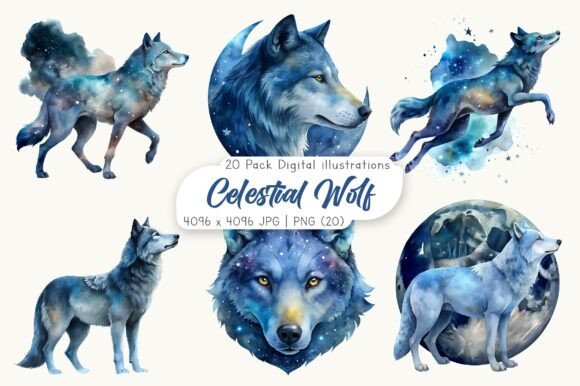
Integrating mystical and artistic elements into modern design projects requires more than just a good eye; it demands high-quality assets that can withstand various printing and digital applications. The Watercolor Celestial Wolf Clipart Bundle has emerged as a popular resource for creators seeking to blend ethereal aesthetics with professional-grade usability. However, simply downloading these files is not enough to guarantee a polished final product. Many designers, from seasoned entrepreneurs to enthusiastic hobbyists, overlook critical technical details that can compromise their work. Understanding how to properly utilize this specific collection of twenty JPG and twenty PNG files ensures that your creative vision translates seamlessly into tangible results.
The Critical Importance of File Format Selection
One of the most common pitfalls users encounter when working with digital art bundles is misunderstanding the distinct roles of JPG and PNG formats. This bundle provides both, totaling forty high-resolution images, yet many beginners indiscriminately use whichever file opens first. This mistake can lead to frustrating visual artifacts, particularly when layering designs.
The PNG files with transparent backgrounds are essential for any project where the wolf imagery needs to sit atop another color, pattern, or photograph. If you attempt to use the JPG versions for stickers, t-shirt transfers, or layered social media graphics, you will be stuck with an opaque white box surrounding the watercolor art. This destroys the fluid, organic feel of the celestial theme. Conversely, using PNGs for simple full-page prints where no layering is required can sometimes result in larger file sizes without added benefit. Always verify which format suits your specific canvas before beginning your layout.
Resolution Misconceptions and Print Quality
A frequent misunderstanding among new sellers on platforms like Etsy or Amazon Merch involves resolution requirements. This bundle offers images at 4096 x 4096 pixels with a 300 DPI rating. While this sounds impressive, some users mistakenly believe they can scale these images up infinitely without consequence. Watercolor textures rely on subtle gradients and soft edges. When stretched beyond their native dimensions, these delicate details can become pixelated or blurry, ruining the premium look of personalized gifts like mugs or greeting cards.
To avoid this, always check the physical print size calculation. At 300 DPI, a 4096-pixel image prints clearly at approximately 13.6 inches square. If your project requires a larger banner or poster, you must use specialized upscaling software rather than standard design tools. For most standard applications such as planners, invitations, and apparel, the native resolution is perfect, but respecting these limits is crucial for maintaining professional quality.
Color Profile Compatibility Issues
The files in this pack are provided in RGB Color mode, which is optimized for screens. This is ideal for digital projects, social media posts, and web-based invitations. However, a significant error occurs when creators send these RGB files directly to professional printers for physical products like high-end brochures or fabric prints. Printers typically use CMYK color models. Without proper conversion, the vibrant blues and purples of the celestial wolf may appear duller or shifted in hue when printed.
Before sending files to a print-on-demand service or a local print shop, check their specific requirements. Some modern digital printers handle RGB well, but traditional offset printing does not. Converting the color profile in your design software allows you to preview and adjust for any potential shifts, ensuring the mystical glow of the watercolor remains intact on paper.
Licensing and Commercial Use Clarity
While this listing specifies an immediate digital download, it is vital to read the accompanying license terms carefully. A common oversight is assuming that "personal use" and "commercial use" are interchangeable. Many creators purchase clipart bundles to sell physical end-products like t-shirts or mugs, which is generally permitted. However, reselling the digital files themselves—such as sharing the zip file or including the raw PNGs in a digital template pack—is usually prohibited.
Violating these terms can lead to account suspensions on marketplaces or legal issues. Always clarify whether you can use the Watercolor Celestial Wolf Clipart Bundle in mass-produced items or if there are limits on the number of units sold. When in doubt, contact the creator directly. Protecting your business starts with respecting intellectual property rights.
Optimizing Workflow for Efficiency
Downloading a zip file containing forty individual images can be disorganized if not managed correctly. Users often dump all files into a single folder, making it difficult to locate specific poses or variations later. A better approach is to create a structured library immediately after extraction. Separate the transparent PNGs from the JPGs into distinct subfolders. Additionally, consider renaming files with descriptive tags such as "wolf_moon_left" or "wolf_stars_right" to speed up future searches.
This organizational step saves hours of time during tight deadlines. For educators and marketers who frequently reuse assets, having a clean, tagged library ensures that the celestial wolf graphics remain a versatile tool rather than a cluttered burden.
Enhancing Designs with Complementary Elements
The watercolor style of this bundle is soft and dreamy. A mistake many make is pairing these images with harsh, geometric fonts or neon colors that clash with the aesthetic. To maintain visual harmony, choose typography that mimics hand-lettering or elegant serifs. Use color palettes that echo the blues, purples, and golds found in the wolf illustrations. This creates a cohesive brand identity for friendship-themed invitations or scrapbooking planners.
Remember, the goal is to let the artwork shine. Overloading the design with too many additional elements can obscure the intricate brushstrokes of the wolf. Keep layouts clean and allow negative space to enhance the celestial mood.
By avoiding these common technical and creative errors, you can fully leverage the potential of this clipart collection. Whether you are creating DIY crafts or launching a new product line, attention to detail in file handling, color management, and design composition will elevate your work from amateur to professional. Enjoy the process of bringing these mystical designs to life, and ensure your final outputs reflect the quality inherent in the original files.